
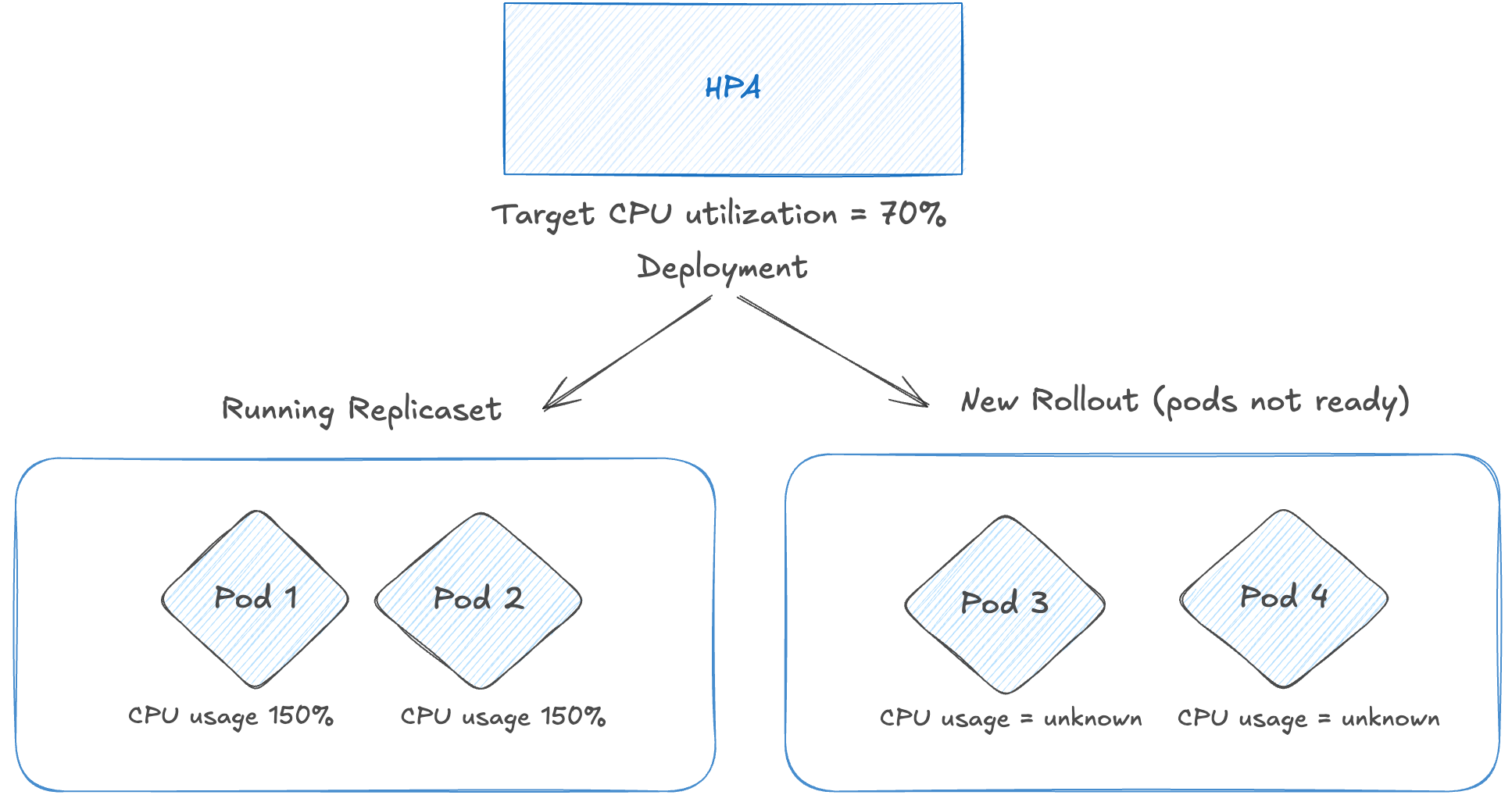
Recently we had an outage in one of our production applications running in k8s, which was non responsive due to high cpu usage.
Before the outage, there a new release was rolled out for the application. The new version required a database schema migration that had not been applied yet.
As a result, the new replicaSet pods kept erroring, failing the startup probes and never became ready. The old ReplicaSet pods continued serving all traffic and eventually hit CPU throttling and probes were failing.
We have configured Horizontal Pod Autoscaling (HPA) with a threshold of 70%, so HPA should’ve scaled up the replicas of the deployment.
But the HPA never scaled up the deployment, even though the running pods CPU usage was above 100. We ended up fixing the missing schema and after that new rollout came up fine.
In this post, I will deep dive on how HPA scales up, how it behaves when there are unReady pods, and how to handle these scenarios.
How HPA Calculates Current Usage
Step 1: Group pods by state
HPA first classifies all pods targeted by the Deployment into four categories.
readyPodCount, unreadyPods, missingPods, ignoredPods := groupPods(

    podList, metrics, resource,

    c.cpuInitializationPeriod, c.delayOfInitialReadinessStatus,

)
Missing Pods are those that have no metrics available and pods that are getting deleted/terminated are considered as ignored pods.
Step 2: First pass - compute usage ratio from ready pods only
HPA removes metrics for ignored and unready pods, then computes the usage ratio only for the ready pods:
removeMetricsForPods(metrics, ignoredPods)

removeMetricsForPods(metrics, unreadyPods)

usageRatio, utilization, rawUtilization, err := metricsclient.GetResourceUtilizationRatio(

    metrics, requests, targetUtilization,

)
GetResourceUtilizationRatio sums up the CPU usage and requests across all pods in the metrics map and returns usageRatio (currentUtilization / targetUtilization)
currentUtilization = (totalCpuUsage * 100) / totalCpuRequests
A ratio > 1.0 means “using more than target - scale up” and ratio < 1.0 means “scale down”.
Step 3: Second pass - add unready pods back at 0% usage (dampening)
If there are unready pods and the first pass says scale up, HPA enters the dampening path and now includes them into the resource utilization ratio.
scaleUpWithUnready := len(unreadyPods) > 0 && usageRatio > 1.0

if scaleUpWithUnready {
// on a scale-up, treat unready pods as using 0% of the resource request
  for podName := range unreadyPods {
    metrics[podName] = metricsclient.PodMetric{Value: 0}
  }

newUsageRatio, _, _, err := metricsclient.GetResourceUtilizationRatio(metrics, requests, targetUtilization)
}
Step 4: Tolerance consideration
Kubernetes has a tolerance threshold for metric variations, configured for all metrics based autoscaling services. This is to prevent autoscaler acting on slighter variances.
For example, consider a HorizontalPodAutoscaler configured with a target memory consumption of 100MiB and a scale-up tolerance of 5%:
behavior:
  scaleUp:
    tolerance: 0.05 # 5% tolerance for scale up
With this configuration, the HPA algorithm will only consider scaling up if the memory consumption is higher than 105MiB (that is: 5% above the target).
By default, there is a cluster-wide tolerance of 10% applied, used by HPA.
After including the unReady pods into resource utilization ratio, HPA checks for tolerance. If it is within the tolerance, it doesn’t scale up.
if tolerances.isWithin(newUsageRatio) || (usageRatio < 1.0 && newUsageRatio > 1.0) || (usageRatio > 1.0 && newUsageRatio < 1.0) {
  // return the current replicas if the change would be too small,
  // or if the new usage ratio would cause a change in scale direction
  return currentReplicas, usage, nil
}
Applying this to our outage scenario
Application resources and HPA configuration
CPU Request/Limit: 2000m/3000m
Limit/Request ratio = 1.5x (max utilization = 150%)
HPA target: 70% average CPU utilization
Deployment minReplicas: 2
Rolling update: maxSurge: 100%, maxUnavailable: 0%
During the incident:
2 old pods (ready) at ~150% CPU utilization
2 new pods (unready) - failing startup probes, 0% used CPU
Step 1 and 2: Calculate usage ratio for ready pods
Usage Total  = 3000m + 3000m = 6000m

Requests Total = 2000m + 2000m = 4000m

Usage Percent = (6000 × 100) / 4000 = 150%

Usage Ratio = 150 / 70 (threshold) = 2.14  → Indicates scale-up

# Since there are unready pods and the initial direction is scale-up,
# HPA recalculates utilization by including unready pods at 0% usage (dampening logic).
Step 3: Recalculate usage ratio including the unready pods
Usage Total  = 3000m + 3000m + 0m + 0m = 6000m
Requests Total = 2000m + 2000m + 2000m + 2000m = 8000m

Usage Percent  = (6000 × 100) / 8000 = 75%

Usage Ratio = 75 / 70 = 1.07  → Indicates scale-up. Check for tolerances.
Step 4: Check for tolerances
By default, HPA has a tolerance of 10%, meaning no scaling action is taken if the usage ratio falls between 0.9 and 1.1.
Since 1.07 falls within this range (0.9 < 1.07 < 1.1), HPA does not scale up.
For HPA to scale up in this scenario, the recalculated usage ratio would need to exceed 1.1.
That would require the old pods to exceed ~150% CPU utilization. However, since CPU limits were set at 3000m (1.5× the request), the pods could not exceed that level.
Why does HPA do this?
HPA is intentionally designed to act conservatively during the rollouts.
During a normal rollout, new pods often take time to initialize . If HPA only looked at the ready pods (old replicaset), it might aggressively scale the deployment while the new pods are still starting. Once those new pods become ready, the deployment would suddenly be over-provisioned and HPA would scale down again.
By including them at 0%, HPA conservatively assumes “these pods will soon be up” and avoid oscillating between scale up/down. And HPA can’t assume that these pods will be ready in X minutes.
Furthermore, if any not-yet-ready pods were present, and the workload would have scaled up without factoring in missing metrics or not-yet-ready pods, the controller conservatively assumes that the not-yet-ready pods are consuming 0% of the desired metric, further dampening the magnitude of a scale up.
After factoring in the not-yet-ready pods and missing metrics, the controller recalculates the usage ratio. If the new ratio reverses the scale direction, or is within the tolerance, the controller doesn’t take any scaling action. In other cases, the new ratio is used to decide any change to the number of Pods.
Possible solutions
There are some possible solutions one can implement to avoid such scenarios.
Alert on UnReady replicas or dangling replicaset
Often when the new release fails (new replicaSet), the service will continue to function with the old replicaset and we tend to ignore it.
The straightforward action to take in this scenario would be to identify and fix the unReady pods.
Kube-state-metrics has following metrics available to identify these kinds of replicas.
kube_deployment_status_replicas_ready
kube_deployment_spec_replicas
kube_pod_container_status_last_terminated_reason
kube_pod_container_status_waiting_reason
So we can make use of them to identify such dangling replica set pods.
Reduce the maxSurge to 50%
MaxSurge is one of the key configuration in the rollout strategy. This decides how many replicas can be spun up in the new replicaSet and decides the rollout time.
We have configured it as 100% for faster rollouts.
Had the maxSurge been configured as 50%, then during the rollout only 1 new replica would’ve been spun up. This will help in the usage ratio calculation.
Assume it’s not ready, then the usage ratio for unReady pods will become (150 + 150 + 0) / 3 = 100% and HPA would’ve triggered the scale up.
Remove CPU limits
Given the cpu limit is configured at 1.5x, the old replicas couldn’t use more than that and they were getting throttled.
Had the limit been not set, they could’ve potentially used available CPU in the underlying node (not guaranteed though) and their real usage would’ve been high. This would give better usage ratio to HPA and lead to scale up.
Keeping/removing CPU limits is a never ending debate in K8s community. There are supporting thoughts on both sides, so one can experiment with it and adopt accordingly.
Ref: https://home.robusta.dev/blog/stop-using-cpu-limits
Key Takeaways
HPA doesn’t only look at ready pods. Unready pods are included in the scale up calculations at 0% usage.
MaxSurge of 100% can fasten up the rollouts. But if the new rollout is failing, it will dilute the utilization and prevent HPA from scaling.
When investigating HPA behavior, it is important to consider rollout configuration, resource limits, and autoscaling tolerance together.
HPA is not a “load scaler” — it is a resource utilization stabilizer, If you're running anything latency-sensitive, CPU-based HPA alone is a trap.
The core issue isn’t misconfiguration — it’s an architectural limitation of HPA itself.
HPA is fundamentally:
1.Reactive (not predictive)
2.Metric-dependent (and often the wrong metric)
3.Averaging-based (which hides localized hotspots)
HPA reacts after the pain starts It scales only after metrics cross thresholds + scrape interval + decision loop + pod startup time. It works on production only when combined with external event driven tools. Though, Good article write up.