
One of my favorite interview questions is about pod names in Kubernetes.
We’re all familiar with the names of the pod created by the deployment. Deployment name + replicaset suffix + random characters.
For example, if you create an nginx deployment, you will likely see
$ k create deployment --image nginx:latest nginx
deployment.apps/nginx created

$ k get pods
NAME                     READY   STATUS              RESTARTS   AGE
nginx-54c98b4f84-l6wqq   0/1     ContainerCreating   0          3s
I usually ask about the middle part - what does 548b4f84 represent? How is this suffix generated and changes for each rollouts?
This question maps neatly to one of the interesting design choices of the deployment in Kubernetes.
I like asking this, because it tells
About candidate’s reasoning and thought process
Whether they know about internal functions of the Kubernetes beyond surface level
How they approach a question even if they don’t know the exact answer
Because this is something, a good engineer can often deduce and figure out on the fly, even if never heard/read before.
Pod Name hierarchy
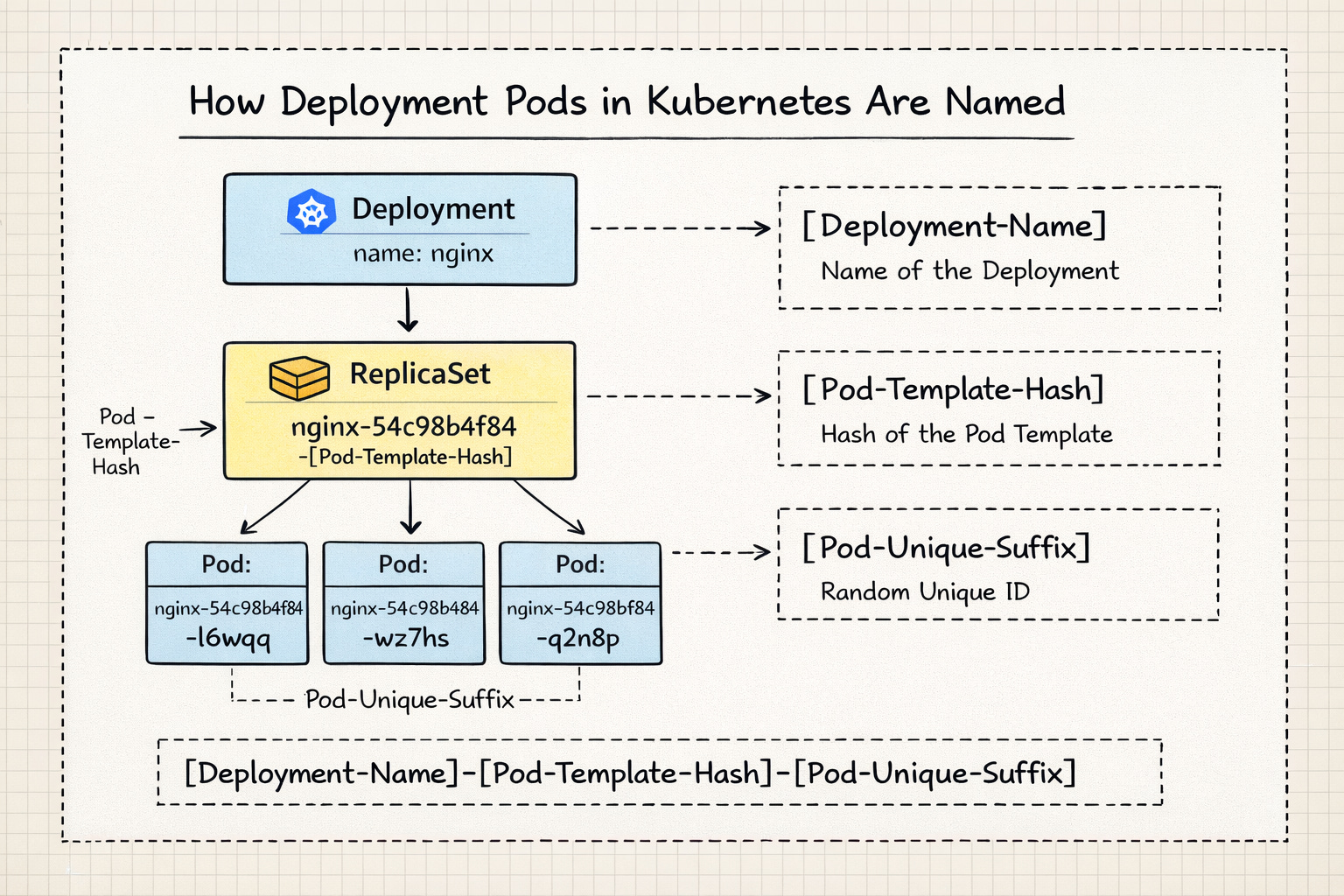
In a Kubernetes Deployment, the Pod name follows a specific hierarchy: [Deployment-Name]-[Pod-Template-Hash]-[Pod-Unique-ID].
Each suffix that follows the deployment name, serves a different purpose in the orchestration process.
Pod Template Hash
The first suffix is a Pod Template Hash.
When you create or update a Deployment, the Deployment controller takes the podTemplate (the configuration of the containers, labels, etc.) and runs it through a hashing algorithm (FNV-32a). The resultant hash is added to the replicaset as pod-template-hash label. The replicaset in turn adds this label to the underlying pods it manages.
This is to ensure that all the pods used by the replicaset are identical.
Kubernetes uses the pod-template-hash both as a label and a selector on ReplicaSets and Pods so that the correct set of Pods is managed by the right ReplicaSet.
$ k describe rs nginx-54c98b4f84

Name:           nginx-54c98b4f84
Namespace:      default
Selector:       app=nginx,pod-template-hash=54c98b4f84
Labels:         app=nginx
                pod-template-hash=54c98b4f84
Annotations:    deployment.kubernetes.io/desired-replicas: 1
                deployment.kubernetes.io/max-replicas: 2
                deployment.kubernetes.io/revision: 1
Controlled By:  Deployment/nginx
...
Pod Template:
  Labels:  app=nginx
           pod-template-hash=54c98b4f84
  Containers:
   nginx:
    Image:         nginx:latest
    Port:          <none>
...
The pod-template-hash label is also applied to the pods managed by this replicaset.
$ k describe pod nginx-54c98b4f84-l6wqq

Name:             nginx-54c98b4f84-l6wqq
Namespace:        default
...
Labels:           app=nginx
                  pod-template-hash=54c98b4f84
Annotations:      <none>
Status:           Running
...
Controlled By:  ReplicaSet/nginx-54c98b4f84
Pod suffix
The second suffix is an unique, random string generated by the replicaset controller.
The replicaset controller uses random string generator for the pod suffix. Given a replicaset could manage N number of pods, this random string is to ensure that every pod gets unique name. If the pod dies and new one comes up, the new pod will have completely new suffix generated randomly.
When we scale the deployment replicas, the replicaset remains the same and the new pods will follow the same.
In the deployment spec, pod template includes the metadata, labels, and container spec.
$ k create deployment --image nginx:latest nginx --dry-run=client -oyaml

apiVersion: apps/v1
kind: Deployment
metadata:
  creationTimestamp: null
  labels:
    app: nginx
  name: nginx
spec:
  replicas: 1
  selector:
    matchLabels:
      app: nginx
  strategy: {}
  template:
    metadata:
      creationTimestamp: null
      labels:
        app: nginx
    spec:
      containers:
      - image: nginx:latest
        name: nginx
        resources: {}
status: {}
Once the deployment is created, we can clearly see the pod template using describe command.
$ k describe deployment nginx

Name:                   nginx
Namespace:              default
CreationTimestamp:      Sat, 17 Jan 2026 17:57:37 +0530
Labels:                 app=nginx
Annotations:            deployment.kubernetes.io/revision: 1
Selector:               app=nginx
...
Pod Template:
  Labels:  app=nginx
  Containers:
   nginx:
    Image:         nginx:latest
    Port:          <none>
    Host Port:     <none>
    Environment:   <none>
    Mounts:        <none>
  Volumes:         <none>
  Node-Selectors:  <none>
  Tolerations:     <none>
So now any change we do on the pod template fields, will cause the template’s hash value to change and lead to creation of new replicaset.
For example, if we update the image version, it will lead to new replicaset creation, which is typically what we observe during the releases.
But when we increase the replicas, the field is outside of the template, so it doesn’t cause any hash value change and the replicaset remains the same.
How rollout restart creates the new replicaset
So far we have seen how changing the pod template leads to change in the hash value and so new replicaset is created. Then by that logic, executing rollout restart shouldn’t change the hash value, given we are not explicitly changing anything the pod template, right?
That’s right. We are not updating anything, rather K8s does it with an annotation. When rollout restart is executed against a deployment, K8s adds an annotation that says kubectl.kubernetes.io/restartedAt: “2026-01-17T20:26:06+05:30” under the pod template.
$ k rollout restart deployment nginx
deployment.apps/nginx restarted

$ k describe deployment nginx

Name:                   nginx
Namespace:              default
CreationTimestamp:      Sat, 17 Jan 2026 17:57:37 +0530
Labels:                 app=nginx
Annotations:            deployment.kubernetes.io/revision: 2
Selector:               app=nginx
Replicas:               1 desired | 1 updated | 2 total | 1 available | 1 unavailable
...
Pod Template:
  Labels:       app=nginx
  Annotations:  kubectl.kubernetes.io/restartedAt: 2026-01-17T20:26:06+05:30
  Containers:
   nginx:
    Image:         nginx:latest
...
This causes the template hash value change and leads to creation of new replicaset.
This is also the reason why even adding the labels to the pods lead to new replicaset creation.
Summary
Each pod backed by the deployment controller, follows the deployment-name + pod template hash + pod unique id.
Any changes to the pod template leads to change in hash value and so warrants a new replicaset. This also explains why very few changes are allowed on the fly and many aren’t.