

Last year, we made a CoreDNS config change where we added a property under the kubernetes plugin. The change was syntactically valid and Terraform applied it successfully with no errors. The cluster looked healthy for two days and everything was running fine.
Then our scheduled node upgrade ran, applications started erroring out with UnknownHostException, and soon the entire stack was unreachable.
During RCA, we found that the config change was invalid. Due to the way EKS add-on and CoreDNS behaved, the incorrect config had turned into a ticking time bomb.
How EKS managed add-ons apply configuration
We manage CoreDNS in EKS using the managed CoreDNS add-on. When EKS creates the CoreDNS add-on, it owns the underlying Kubernetes resources, including the CoreDNS Deployment, Service, ConfigMap, etc.,
We update the add-on through aws_eks_addon resource in Terraform and pass configuration values. Every config change applied becomes an add-on update.
EKS validates and accepts the update, mutates the underlying resources, and reports the update as InProgress or Successful.
But "successful" means the API accepted the configuration and applied it to the underlying resources. It does not mean add-on is functioning correctly with the change.
In this example, I’m updating the CoreDNS add-on’s minReplicas to 6 (earlier it was 5).
# truncated command
$ aws eks update-addon --region us-east-1\
  --cluster-name example-cluster \
  --addon-name coredns \
  --resolve-conflicts OVERWRITE \
  --configuration-values '{
    "autoScaling": {
      "enabled": true,
      "maxReplicas": 10,
      "minReplicas": 6
    },
    "corefile": ".:53 {\n    errors\n    health {\n        lameduck 5s\n    }\n    ready\n    kubernetes cluster.local in-addr.arpa ip6.arpa {\n        pods insecure\n        fallthrough in-addr.arpa ip6.arpa\n        ttl 30\n    }\n    prometheus :9153\n    forward . /etc/resolv.conf {\n        max_concurrent 300\n    }\n    cache 30\n    loop\n    reload\n    loadbalance\n    \n}",
    "resources": {
      "limits": {
        "cpu": "100m",
        "memory": "150Mi"
      },
      "requests": {
        "cpu": "100m",
        "memory": "150Mi"
      }
    },
In the console, it will show the update under Update History
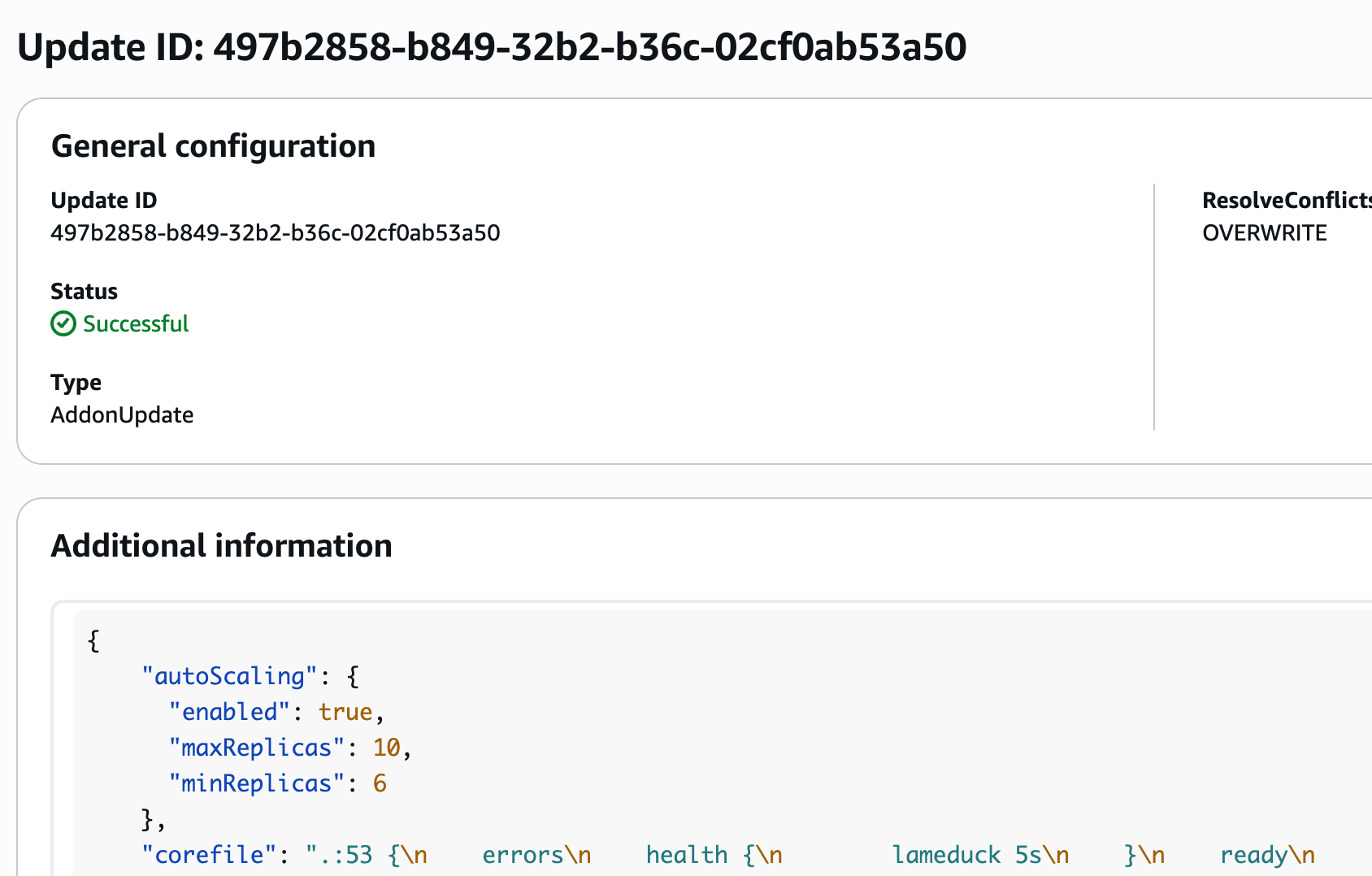
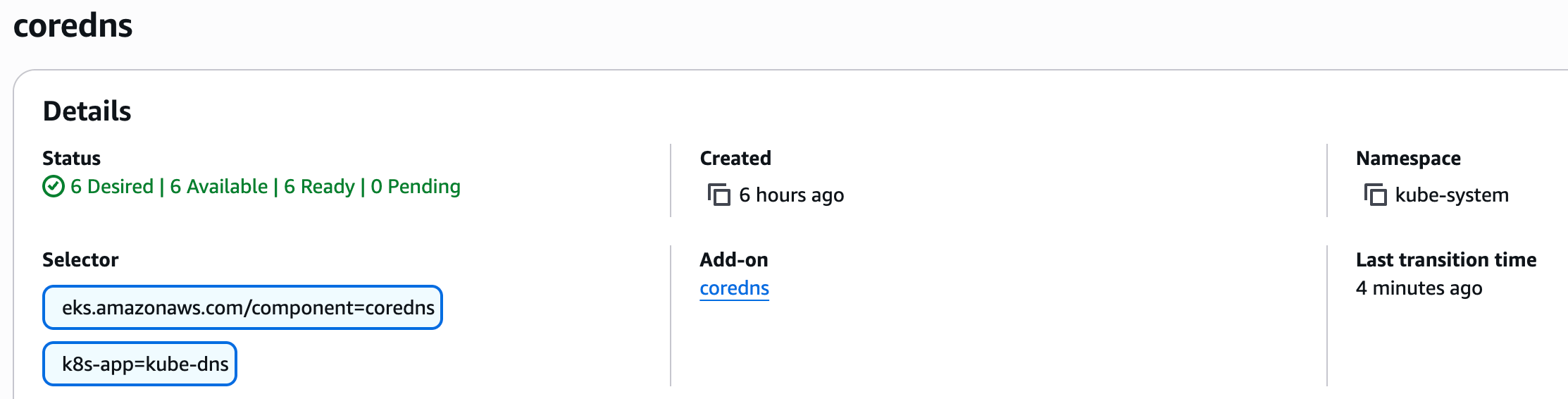
The add-on updates the desired replicas to 6 in the deployment.
What EKS validates and what it does not
EKS exposes a JSON schema for every add-on configuration. The schema defines what fields, values are supported and allows us to customize them.
To check the supported configuration of CoreDNS add-on schema, run
aws eks describe-addon-configuration \
  --addon-name coredns \
  --addon-version versionNumber \
  | jq -r .configurationSchema | jq .
If we send an unsupported field, EKS rejects it immediately.
For example, when we pass minReplica instead of minReplicas
 ~ aws eks update-addon --region us-east-1\
  --cluster-name glean-cluster \
  --addon-name coredns \
  --resolve-conflicts OVERWRITE \
  --configuration-values '{
    "autoScaling": {
      "enabled": true,
      "maxReplicas": 10,
      "minReplica": 6,
    },

An error occurred (InvalidParameterException) when calling the UpdateAddon operation:
ConfigurationValue provided in request is not supported:
Yaml schema validation failed with error:
[$.autoScaling.minReplica: is not defined in the schema
and the schema does not allow additional properties]
The add-on schema treats corefile as a string value. So EKS can only validate the JSON object structurally but it doesn’t understand the semantics of the CoreDNS configs inside that string. So the change can be schema-valid for EKS API and still be runtime-invalid for CoreDNS.
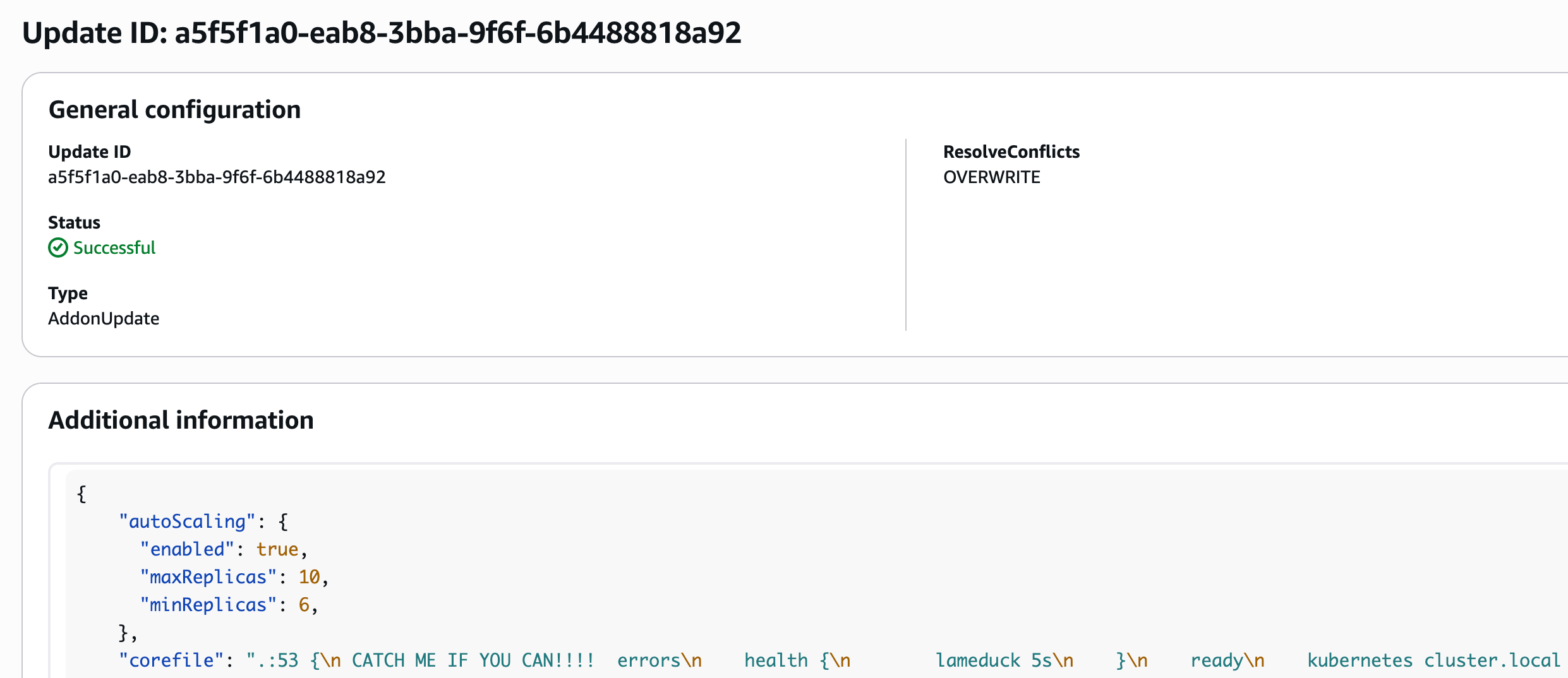
In the below example, I’m intentionally adding the bug “CATCH ME IF YOU CAN!!!” in the corefile section.
 ~ aws eks update-addon --region us-east-1\
  --cluster-name example-cluster \
  --addon-name coredns \
  --resolve-conflicts OVERWRITE \
  --configuration-values '{
    "autoScaling": {
      "enabled": true,
      "maxReplicas": 10,
      "minReplicas": 6,
    },
    "corefile": ".:53 {\n CATCH ME IF YOU CAN!!!!  errors\n    health {\n        lameduck 5s\n    }\n    ready\n    kubernetes cluster.local in-addr.arpa ip6.arpa {\n        pods insecure\n        fallthrough in-addr.arpa ip6.arpa\n        ttl 30\n    }\n    prometheus :9153\n    forward . /etc/resolv.conf {\n        max_concurrent 300\n    }\n    cache 30\n    loop\n    reload\n    loadbalance\n    \n}"}
And EKS updated the add-on with our bug successfully.
Why the change did not fail immediately
When the add-on update ran, EKS updated the CoreDNS ConfigMap with the new Corefile (buggy).
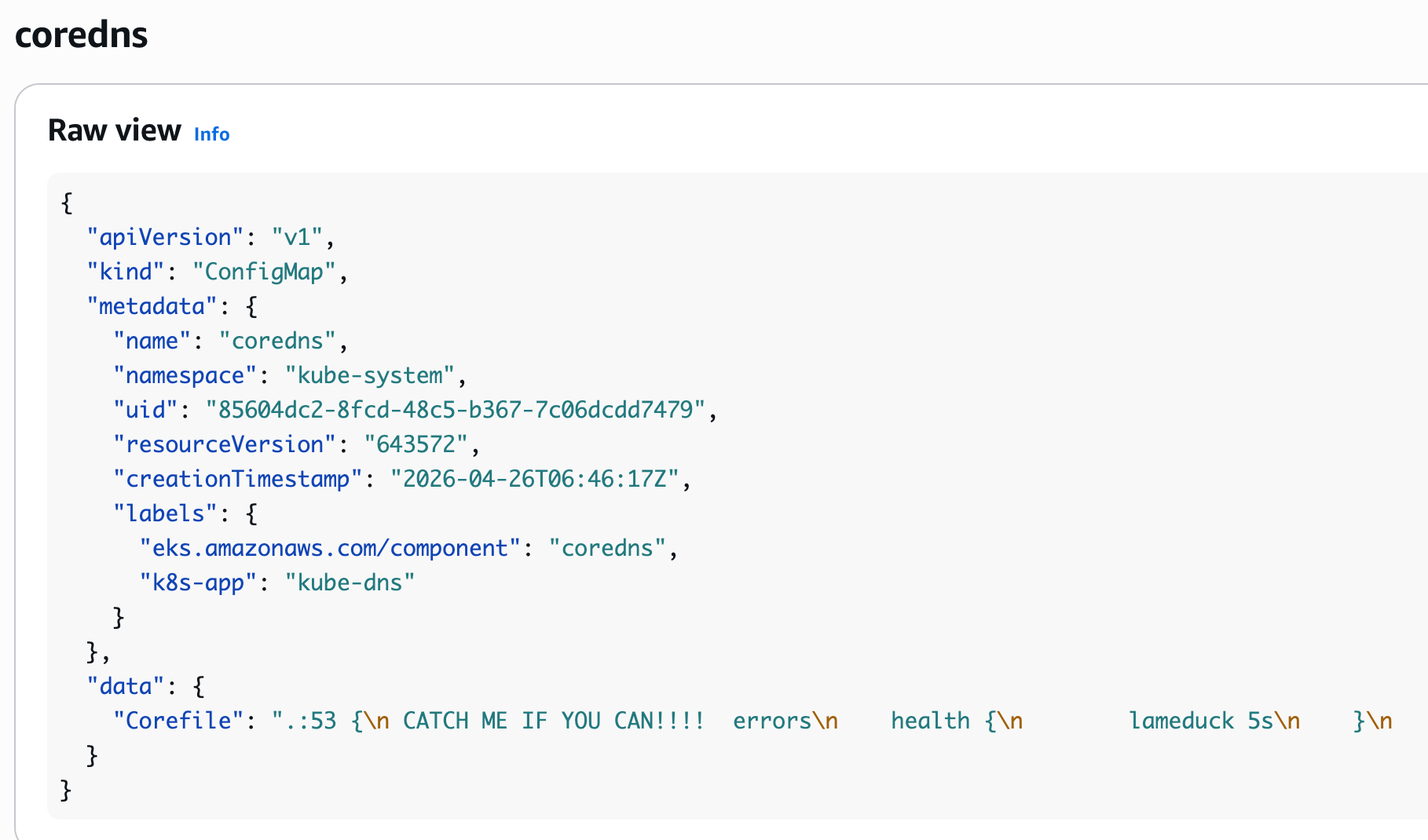
During our CoreDNS add-on update, EKS temporarily reconciled the Deployment back to the default replica count of 2 before scaling it back up to the configured target. That effectively restarted n-2 CoreDNS pods.
Similar behavior has been reported publicly in aws/containers-roadmap#2540.
In the below screenshot, we can see CoreDNS restarted n-2 pods, 2 are running fine and the rest are in crashloopbackoff state.
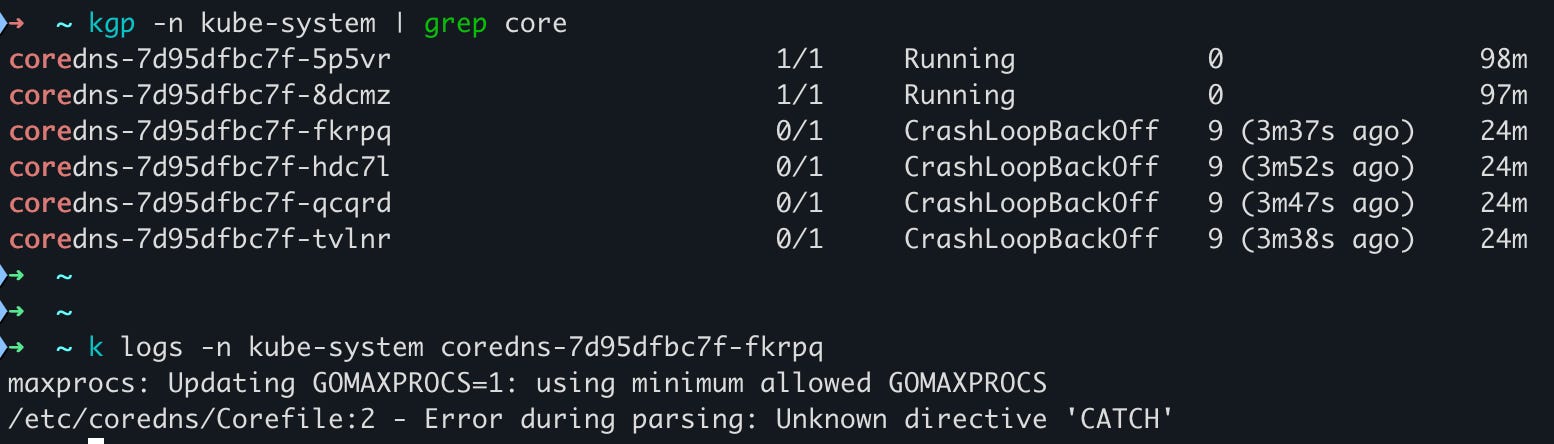
At this stage, the bug is successfully propagated, but the two CoreDNS replicas are still running and serving the DNS requests.
In our case, we mistakenly added ndots as a directive inside the Corefile. CoreDNS has no concept of ndots and so every new pod hit “unknown property 'ndots'“ and crashed. However this was masked due to the 2 running pods.
Why the Corefile ConfigMap update didn’t affect the 2 replicas?
CoreDNS uses a reload plugin, which is responsible for loading the Corefile whenever it changes.
However if the reload fails, then CoreDNS rejects the new config and continues running with the previous working config.
From CoreDNS reload plugin documentation,
reload allows automatic reload of a changed Corefile.
This plugin periodically checks if the Corefile has changed by reading it and calculating its SHA512 checksum. If the file has changed, it reloads CoreDNS with the new Corefile.
The reloads are graceful - you should not see any loss of service when the reload happens. Even if the new Corefile has an error, CoreDNS will continue to run the old config and an error message will be printed to the log.

This graceful reload is created as a safety feature for CoreDNS, but in this scenario, it unintentionally hid our bug. Because those pods continued to run and serve the traffic, the only way to identify the issue was with better observability (which is covered later in the section).
Why the node upgrade triggered the outage?
During the node groups upgrade, both the pods got force evicted (we used force_update_version as true in the aws_eks_node_group configuration).
When the replacement pods came in, they started using the Corefile in the ConfigMap and crashed. At that point the cluster lost the last working CoreDNS instances and the DNS outage became visible.
The key thing is outage didn’t begin during the node upgrade. The node upgrade only exposed an invalid state that had already been sitting in the cluster for two days.
Why the recovery was delayed?
The workaround was simply to revert the Corefile change and run Terraform apply again. But since DNS itself was down, our Terraform deploy was stuck because our deploy pipeline had some dependencies on DNS. We ended up running a manual aws eks update-addon command to push the corrected Corefile and bypass the deployment pipeline entirely.
How this could’ve been prevented?
Validate the Corefile outside EKS before applying it
As we learned, the EKS add-on schema can’t validate the contents inside the Corefile. After this incident, we added an integration test for CoreDNS configuration changes. Any Corefile change is now validated by starting a CoreDNS container with the generated Corefile and verifying that CoreDNS starts successfully and responds to a DNS query.
Monitoring the add-on status
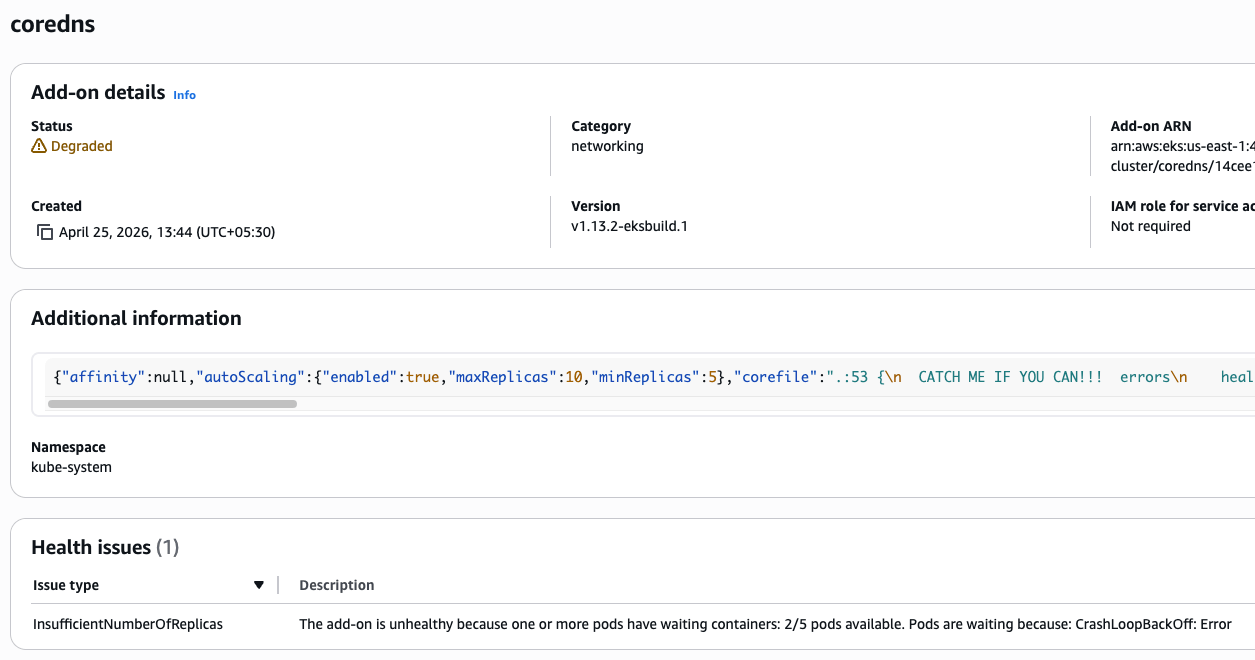
EKS add-ons will move to
DEGRADEDstatus if the underlying deployment pod’s starts failing. Alerting on this status would have given us an earlier signal that the add-on is failing after our update.
Improved CoreDNS observability
Before this incident, we had alerts on the CoreDNS error rate, which was not enough. In this failure mode, the better signal was that CoreDNS pods were failing to load the Corefile.
So we started capturing more critical signals such as
coredns_panics_total
coredns_reload_failed_total
coredns pod restarts
coredns deployment replicas not ready
Disabling forced node group upgrade
We update our node groups every week to ensure that the AMIs are up to date and to avoid any blockers, we used force_update_version. We disabled this config after the outage. We now investigate why an upgrade is blocked in the node group and take corrective actions, instead of forcing it.
Takeaway
The key takeaway is critical add-on changes are not complete when the API accepts it. They are complete only when a newly started pod can run with the applied configuration and service works fine.
In this incident, the configuration was schema-valid for EKS but runtime-invalid for CoreDNS. The behaviour of CoreDNS reload protected the running pods and left the cluster in a latent failure state. The cluster was healthy enough to serve traffic, but not healthy enough to restart the components.
For all critical managed add-ons and controller-driven components, we need to validate both control-plane acceptance and runtime correctness. That means targeted schema validations, integration testing, synthetic checks, and broader observability signals to catch such failed config application.